Twenty CRM integration
Sync people from your CRM, trigger campaigns when a deal moves, and write engagement back onto the record your salespeople read.
Connect your Twenty workspace and CRM records flow both ways: people arrive as contacts, deal movements arrive as events, and campaign steps can write notes, tasks and fields back onto the CRM record.
What it unlocks
- Deal-driven campaigns — start an onboarding sequence the moment an opportunity is marked won.
- Revenue attribution —
deal.woncarries the amount and currency, so a campaign's result can be measured in pipeline rather than opens. - Contacts that stay in step — a person edited in the CRM updates the contact here, without a CSV in between.
- Engagement your sales team can see — write a note or a task onto the person's timeline in the tool they already have open.
Connect Twenty
- Create an API key under Settings → Developers in EngageApp. That key is how Twenty authenticates to us.
- In Twenty, go to Settings → APIs & Webhooks and create an API key. That one is how we authenticate to Twenty.
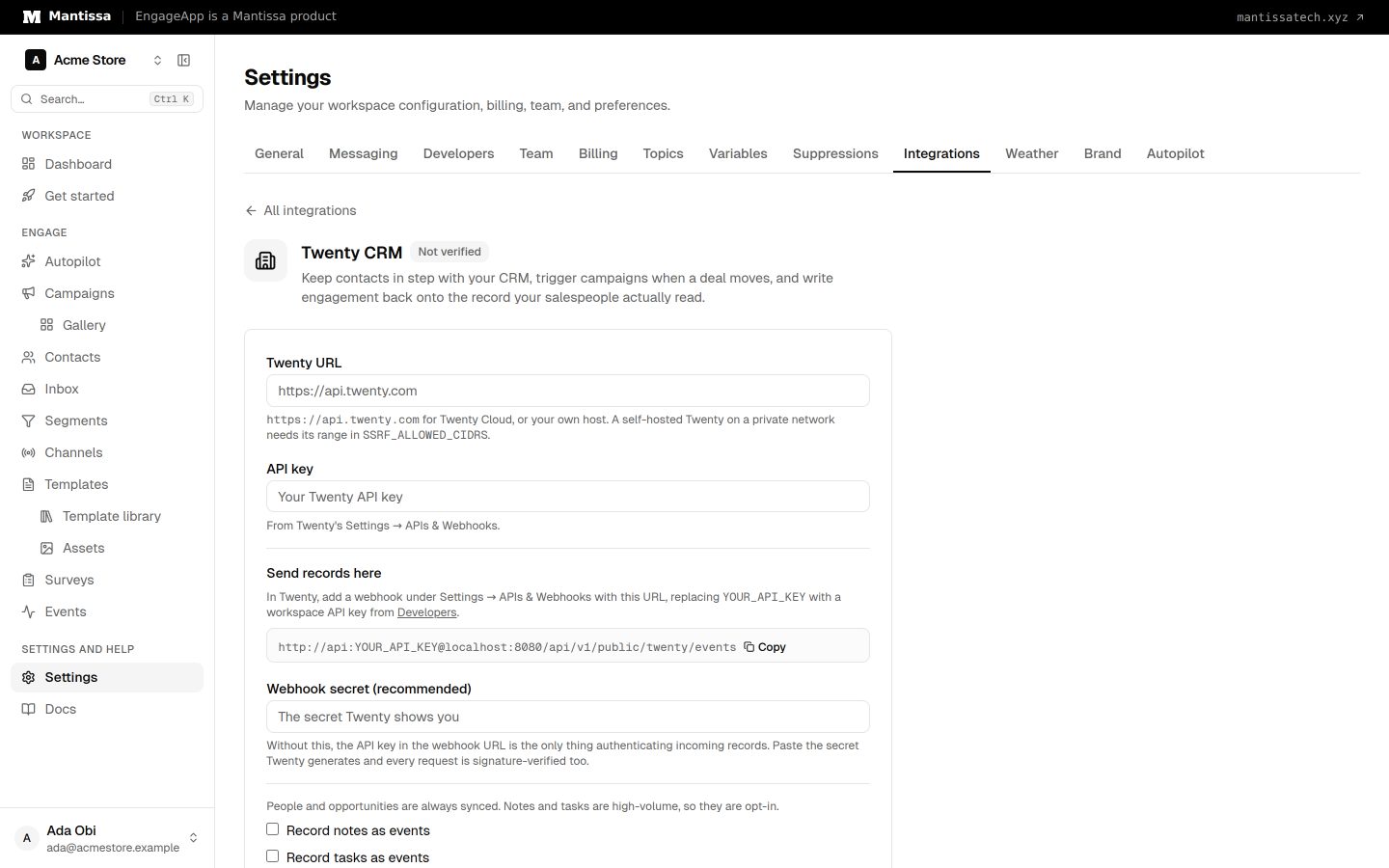
- In EngageApp, open Settings → Integrations and choose Twenty CRM. Fill in the Twenty URL (
https://api.twenty.comfor Twenty Cloud) and the API key, choose Save, then press Test connection. - Copy the webhook URL from the Twenty page and add it in Twenty under the same APIs & Webhooks screen, replacing
YOUR_API_KEYwith the key from step 1. - Paste the webhook secret Twenty generates into the Webhook secret field, then choose Save. This is optional but recommended — see below.
About the webhook secret
Twenty signs every webhook it sends. When you store the secret, each incoming request is checked against that signature and against its timestamp, so a captured request can't be replayed later. Without the secret, the API key inside the webhook URL is the only thing authenticating incoming records — which works, but is weaker. Paste the secret.
What arrives
| In Twenty | In EngageApp |
|---|---|
| Person created or updated | The contact is created or updated — name, email, phone, plus any fields you map. |
| Person deleted | The contact is kept and stamped with twenty_deleted_at. Deleting it would destroy delivery history and unsubscribe state for someone you may restore. |
| Opportunity created | deal.created |
| Opportunity stage change | deal.stage_changed, plus deal.won or deal.lost when the new stage is one of those. |
| Note or task created | crm.note_created / crm.task_created — opt-in. |
Deal events carry opportunity_id, name, stage, previous_stage, amount, currency, close_date and company_id. Amounts are converted from Twenty's internal micros, so {{ event.amount }} is the figure you'd expect.
Only a stage change produces a deal event. Twenty fires a webhook on every field edit, and turning each one into an event would bury the contact's timeline in noise.
Writing back to the CRM
Add an action step to a campaign and choose Write to Twenty CRM. Four things it can do:
- Add a note — appears on the person's timeline. The lowest-risk and most useful of the four.
- Create a task — with an optional due date, counted from when the step runs.
- Set fields — patch named fields on the person, e.g. an engagement stage.
- Sync engagement fields — push the contact's lifecycle stage and subscription state. See below.
Titles, bodies and field values all render template variables, so {{ contact.first_name }} means the same thing here as in an email.
A write-back step only works on a contact the sync has already matched to a CRM record. A contact Twenty has never seen fails the step with that reason, rather than guessing at a person by email — a wrong guess would write one customer's engagement onto another's record.
Engagement fields
A set fields step needs fields to write to, and Twenty's schema is defined per workspace — so there may be none. Press Create engagement fields on the Twenty page and EngageApp adds four to the Person object through Twenty's Metadata API:
engagementLifecycleStage— the stage Engagement Autopilot classified this person intoengagementLastCampaign— the campaign they were most recently enrolled inengagementScoreengagementSubscribed— whether they still accept marketing
It is safe to press twice: fields that already exist are left alone, and one you have since renamed or removed on purpose is not silently recreated. An empty result on a re-run means everything is already in place.
Mapping your own fields
Twenty's data model is defined per workspace, so anything beyond name, email and phone is reachable through the integration's field map: name the Twenty field and the contact attribute it should land in.
Keeping CRM fields current automatically
The Sync engagement fields operation pushes a contact's current lifecycle stage and subscription state onto their CRM record. There's nothing to configure — the values come from the contact.
Combine it with a segment membership trigger and you have a continuous one-way sync: a one-step campaign that fires whenever someone joins or leaves a segment and writes their current state to Twenty. That's the whole mechanism — no separate sync to configure or monitor.
Loops, and why there aren't any
A campaign triggered by CRM updates that also writes back to the CRM would, naively, re-trigger itself. It doesn't: after any write, webhooks about that record are ignored briefly, so the echo of our own change is dropped while a genuine edit made later still lands.
Self-hosted Twenty
If your Twenty runs on a private network, whoever operates this deployment needs to add its address range to SSRF_ALLOWED_CIDRS.
Troubleshooting
- Nothing arriving? The ingest endpoint answers with a count —
ingested,duplicate,suppressedandskipped— visible in Twenty's webhook log. Everything skipped usually means the object isn't one you've opted into syncing. - Deal events aren't landing on anyone? An opportunity is attributed through its point of contact. An opportunity with none can't be matched to a contact.
- 401 on every webhook? The stored webhook secret doesn't match the one Twenty is signing with. Re-copy it, or clear it to fall back to API-key-only authentication.
- A field write fails — Twenty returns the reason (usually a field name that doesn't exist in your workspace) and it appears on the campaign's activity timeline.
Related
Events
Send behavioral events about your contacts to trigger campaigns, gate waits, and power segments.
Triggers & enrollment
A trigger decides how contacts get enrolled into a campaign — manually, by event, on a schedule, or when they join or leave a segment.
Contacts
How EngageApp models your end-users as contacts, the fields they carry, and the ways to add them.
API keys
Create and manage secret, publishable, and scoped Action API keys. Secret df_ keys do not grant dashboard or campaign access.