API keys
Create and manage secret, publishable, and scoped Action API keys. Secret df_ keys do not grant dashboard or campaign access.
API keys authenticate your integrations with EngageApp. Create and manage secret and publishable keys in the API keys card under Settings → Developers. Action keys are a separate class — see Actions Gateway.
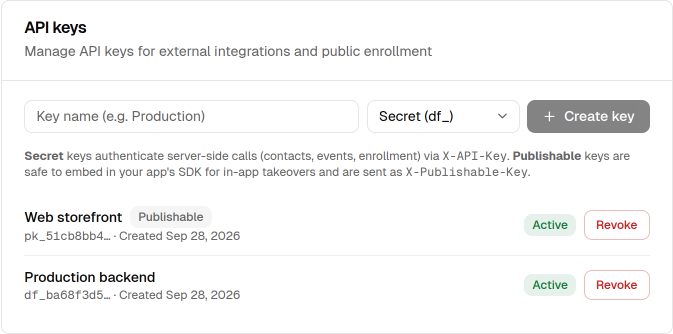
There are three kinds. None of them is “full admin via chat.”
Secret keys
Secret keys (df_…) authenticate your server-side ingest calls — importing contacts, ingesting events, and enrolling contacts. They are workspace-scoped and otherwise unscoped: they do not list campaigns, read credits, or operate Autopilot. Send them as the X-API-Key header:
X-API-Key: df_your_secret_keyNever expose a secret key in client code. Keep it on your server or in a secrets manager.
Publishable keys
Publishable keys (pk_…) are safe to embed in your app. The client SDKs use them for in-app takeovers. Send them as the X-Publishable-Key header:
X-Publishable-Key: pk_your_publishable_keyCopying, rotating & revoking
The full plaintext key is shown only once, when you create it — copy it then and store it securely. If you lose it, create a new key rather than trying to recover the old one. You can revoke a key at any time from Settings → Developers. There is no rotate button. To rotate a key, create a new key, deploy it, then revoke the old one.
Action keys
Action keys (act_…) authenticate the Actions Gateway for customer bots. They carry explicit scopes (read, write:draft, write:live, configure). A secret df_ key is rejected on every Actions route.
Next steps
- Call the ingest endpoints in the API reference.
- Connect a bot with the Actions Gateway.
- Embed a publishable key with the web SDK.
- Set up an in-app takeover channel.
Related
Server-side integration guide
Connect EngageApp to your backend with a secret API key — sync contacts, track events, and enroll contacts into campaigns.
Public API reference
The public HTTP API for server-side and SDK integrations — authentication headers and endpoints.
Actions Gateway
Scoped Action API keys so customer bots can read EngageApp campaigns, segments, channels, credits, and Autopilot — without using unscoped df_ keys.
Web SDK reference
API reference for @engageapp/inapp-web: init, identify, onAppForeground, setHandlers, and dismiss.
In-App Takeover setup
Integrate the EngageApp SDK (Web or Flutter) so full-screen in-app takeover campaigns render natively when your users open your app.