WhatsApp channel
Send WhatsApp messages through the official Meta Cloud API: lanes, the 24-hour window, opt-in, templates and costs.
The WhatsApp channel reaches your contacts on WhatsApp through the official Meta WhatsApp Business Cloud API. Your credentials are encrypted at rest.
Connect WhatsApp
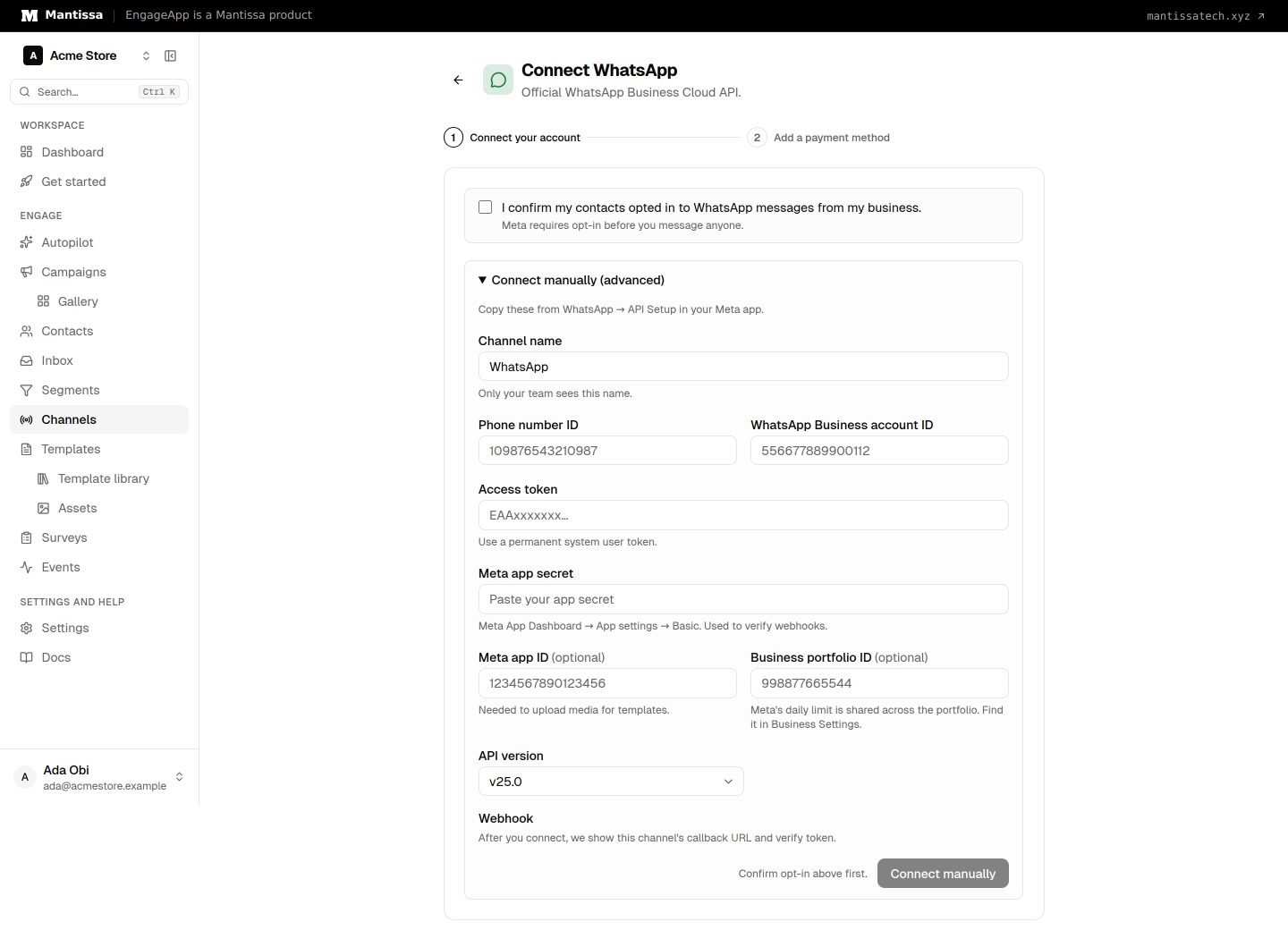
Open Channels → Add channel → WhatsApp (or Channels → Connect WhatsApp). First confirm that your contacts opted in to WhatsApp messages from your business; Meta requires it, and EngageApp will not save the channel without it.
When your EngageApp operator has configured a Meta app, the primary action is Connect with Meta — you finish Meta's Embedded Signup popup and EngageApp stores the channel. You never paste an access token. Replies and delivery statuses then arrive on EngageApp's platform webhook with no setup.
If that button is missing, open Connect manually (advanced) and fill in the phone number ID, WhatsApp Business account ID, access token, Meta app secret (Meta App Dashboard → App settings → Basic), and API version. EngageApp then opens the channel page, where the Webhook setup card shows this channel's callback URL (/api/v1/webhooks/whatsapp-cloud/{channel_id}) and verify token. In your Meta app, open WhatsApp → Configuration, paste both, and subscribe to these fields: messages, message_template_status_update, message_template_quality_update, template_category_update, phone_number_quality_update, account_update and user_preferences. EngageApp uses the app secret to check that each webhook call really comes from Meta; without it, replies and statuses are refused.
Saved secrets are never shown again. To replace the access token or app secret, type a new value on the channel page; leave the field blank to keep the saved one.
Finish the popup with a phone number added and verified. If you close it before that, nothing is saved and you can start again.
You can also connect a number you already use in the WhatsApp Business app. The number stays on your phone, and Meta limits it to 20 messages per second.
After connecting: add a payment method with Meta
Meta bills your WhatsApp Business account directly for messages sent through the Cloud API. Meta requires a payment method on the account before you can send business-initiated messages such as marketing, utility, and authentication templates. From 1 October 2026, Meta also charges for service messages; without a payment method, Meta stops delivering them. EngageApp credits do not cover Meta's charges.
- Open WhatsApp Manager and select the account you connected.
- Open the account menu (three dots), then Manage account settings, then Payment settings.
- Under Billing & payments, choose Add payment method and follow the prompts. Meta may ask for business and tax details.
You need the Manage WhatsApp account permission on that account. See Meta's help article Add a credit card to your WhatsApp Business Platform account.
Number health
The channel page shows what Meta reports for your number: display name and its review status, quality rating (high, medium or low), and your messaging limit — how many different contacts you may reach outside the 24-hour window in a rolling day. A bar shows how much of it you used. Select Refresh to ask Meta again. If Meta flags the account (for example a payment issue or a restriction), an alert tells you what to fix in WhatsApp Manager.
Message lanes
Every WhatsApp message goes out in one of four lanes. The lane decides when you may send and what it costs.
| Lane | What it is | When you can send |
|---|---|---|
| Reply (24h window) | Free-form text | Only within 24 hours of the contact's last message to you |
| Utility | Approved template about an order, account or booking | Any time |
| Authentication | Approved template with a one-time code | Any time |
| Marketing | Approved template with offers or news | Any time, with the marketing rules below |
Direct Send lets you send a utility message, such as an order update, without an approved template. Turn it on in WhatsApp Manager first, then turn on Direct Send is on under Messaging rules. It is charged at the utility rate.
The 24-hour window
When a contact messages your number, a 24-hour window opens. Inside it you can send free-form replies. Once it closes, you can only send an approved template. A campaign step with a free-form message skips contacts whose window is closed.
Templates
Open the channel page and use the Templates panel. New template lets you write a name, language, category, optional header (text, image, video or document), body with numbered variables such as {{1}} or named ones such as {{order_id}}, optional footer, and up to three quick-reply buttons or up to two link buttons and one call button. Meta needs an example value for each variable. Meta reviews every template; its status shows as pending, approved or rejected (with the reason). Sync from Meta pulls in templates you made in WhatsApp Manager. Deleting a template removes every language of it at Meta.
Pick the category honestly: Meta moves promotional utility templates to marketing, which changes the price and the rules.
To send one in a campaign, create a WhatsApp message in Templates, choose the approved Meta template, and map each variable to contact or event data.
Opt-in and consent
Meta requires that contacts opt in before you message them. Under Messaging rules, choose how your contacts opted in (website form, checkout, keyword and so on). Marketing stays off until you confirm this. Turn on Require explicit consent per contact to send marketing only to contacts with a recorded consent.
The Opt-in link card gives you a wa.me link and a QR code you can download. Contacts who send the opt-in keyword (for example START) are opted in and get a confirmation.
STOP and START keywords
A contact who sends STOP, STOP ALL, UNSUBSCRIBE, CANCEL, END, QUIT or OPT OUT stops receiving marketing and gets a short reply. START, UNSTOP, SUBSCRIBE or OPT IN brings them back. You can add your own keywords and change both replies under Messaging rules.
Marketing limits
- Marketing is off until you choose an opt-in method.
- No marketing to US (+1) numbers. Meta does not deliver it.
- Each contact gets at most 1 marketing message a day and 3 a week by default. Change the caps under Messaging rules (0 keeps the default).
- Contacts who sent STOP or revoked consent are skipped.
- If Meta pauses marketing to a contact, EngageApp waits and tries again later.
Turn on Use Marketing Messages API for better marketing delivery. Your Meta account must accept the Marketing Messages API terms first.
Skipped sends show on the campaign's failures page with the reason, such as "WhatsApp marketing cap reached for today."
Reply in the inbox
Replies from your contacts appear in Inbox. Open a conversation to read it and send a free-form reply while the 24-hour window is open. The inbox shows how long the window has left. After it closes, reach the contact with a campaign that uses a Meta template.
Respect your recipients
WhatsApp is a personal channel, so apply your deliverability settings — frequency caps and quiet hours — to avoid over-messaging.
Credit cost
EngageApp charges credits per lane, only when Meta reports the message delivered. Default costs:
| Lane | Credits per delivered message |
|---|---|
| Marketing | 5 |
| Utility | 3 |
| Authentication | 3 |
| Reply (24h window) | 2 |
These credits pay for EngageApp. Meta bills your WhatsApp Business account directly for its own charges. From 1 October 2026 Meta also charges for service messages, so keep a payment method on the account.
Next steps
Related
Channels overview
The delivery channels EngageApp supports — email, SMS, WhatsApp, push, custom API, and full-screen in-app takeovers.
Templates
Author reusable message content for each channel, with per-contact merge fields resolved at send time.
Deliverability settings
Frequency caps, quiet hours, send-time optimization, and deep-link settings that protect your users and sender reputation.