Analytics
Workspace-wide and per-campaign analytics — delivered, opens, clicks, conversions, bounces, and failures.
EngageApp reports analytics at two levels so you can see the big picture and drill into any single campaign.
Dashboard
The Dashboard gives you a workspace-wide view across all your campaigns — a running summary of how your messaging is performing overall.
Campaign analytics
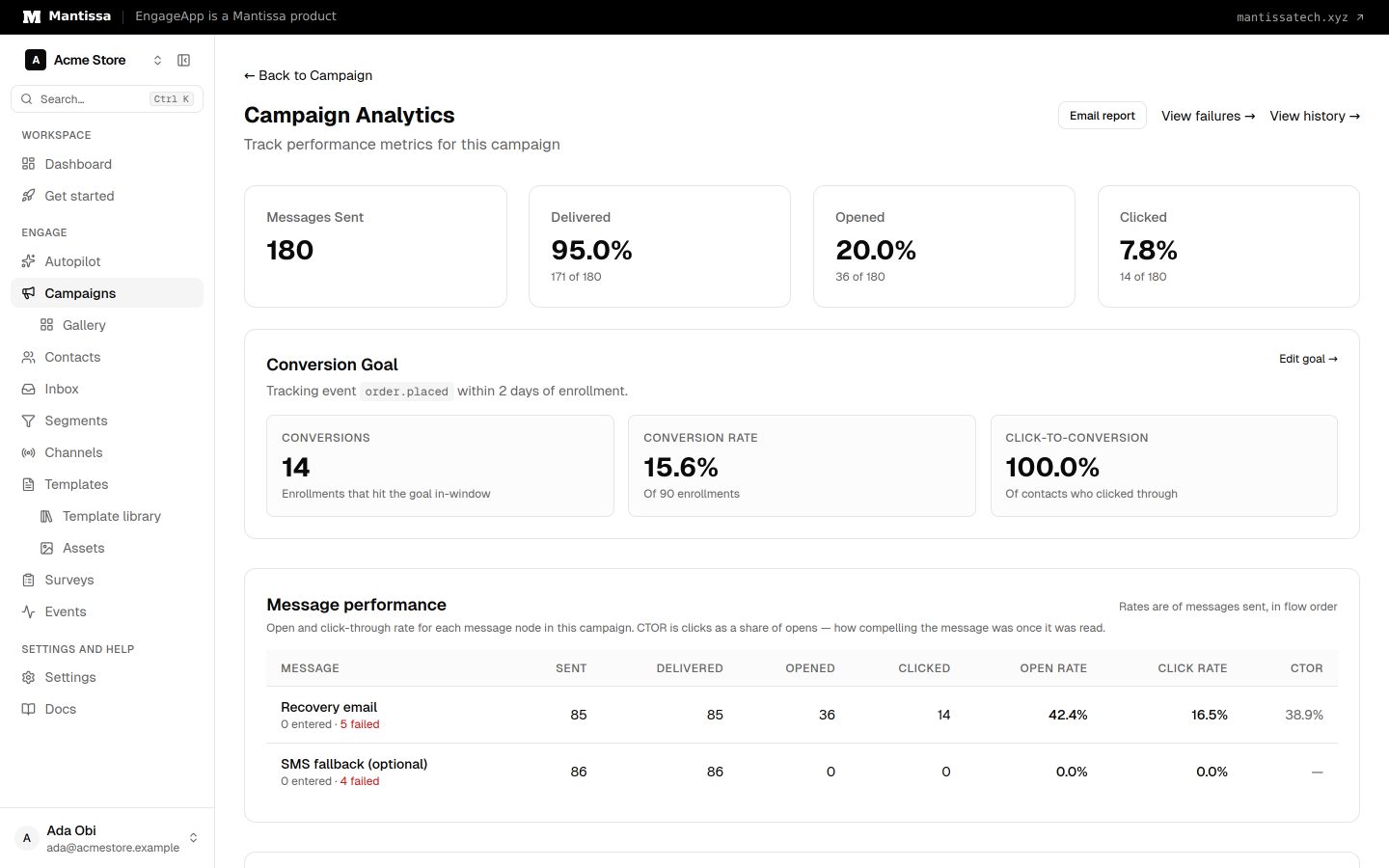
Open Campaign → Analytics for a single campaign. Metrics are reported per step and per campaign, including delivered, opens, clicks, conversions, bounces, and failures. You can drill into individual contact journeys and review the campaign's run history.
Conversions
Conversion goals attribute success events back to your campaigns, so the conversions you see reflect the outcomes that matter to you.
Failures
Delivery failures are listed per campaign under Campaign → Failures. Use this to spot problem recipients, providers, or content before they drag down your results.
Iterate
Read these numbers to improve your copy and timing, and to compare A/B variants so you keep shipping the version that performs best.
Next steps
Related
Campaigns overview
A campaign is a visual, multi-step flow that enrolls contacts and sends them messages across channels.
A/B testing
Add weighted message variants to a send step to test different templates and compare their performance in analytics.
Events
Send behavioral events about your contacts to trigger campaigns, gate waits, and power segments.