Topping up
How to add credits to your workspace wallet with Flutterwave, and how settlement is handled safely.
Topping up adds credits to your workspace wallet so campaigns can keep delivering. You buy credits up front, and every delivery debits them as described in Billing & credits.
Adding credits
Open Settings → Billing and use the Add credits card. Either choose a credit package or enter a custom amount. Credit packages may include bonus credits on top of the amount you pay for. Only owners, admins, and members with the Finance role can top up.
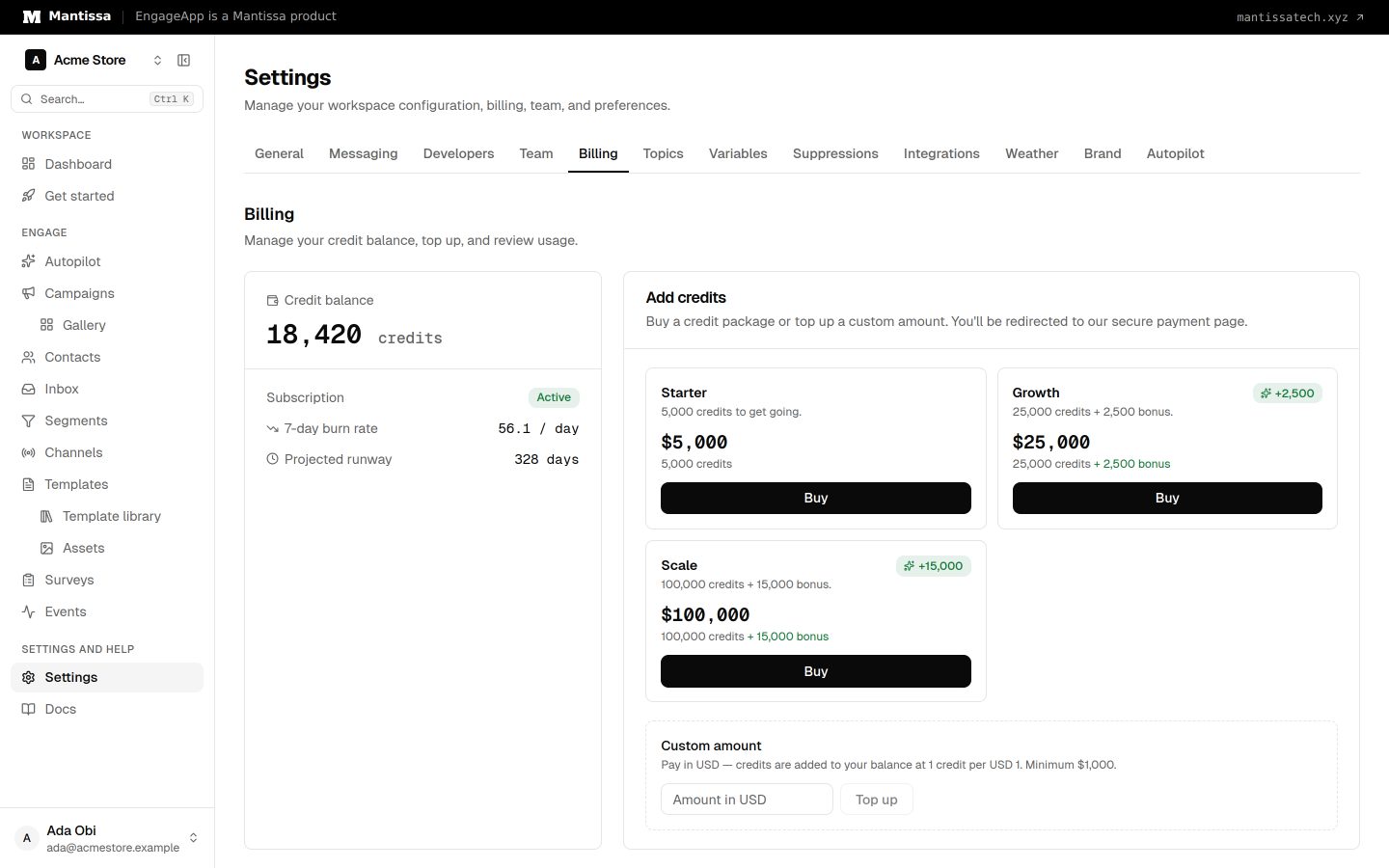
Paying with Flutterwave
Payment is processed by Flutterwave. When configured, it opens as an inline in-page modal; otherwise you are redirected to Flutterwave's hosted checkout. After paying, you are returned to the Billing tab and your wallet is credited.
Safe, idempotent settlement
Settlement is idempotent: it is handled via a redirect verification and/or a Flutterwave webhook, so you are never double-charged or double-credited even if a page is reloaded or a callback arrives more than once.
Watching the ledger
New transactions appear in the ledger immediately. A top-up starts as pending and moves to completed once the payment settles. If you don't see credits right away, refresh the Billing tab — the webhook may still be finalizing.
Next steps
- Understand how credits are spent in Billing & credits.
- Control who can top up under Team & roles.