Triggers & enrollment
A trigger decides how contacts get enrolled into a campaign — manually, by event, on a schedule, or when they join or leave a segment.
A trigger decides how contacts get enrolled into a campaign. Every campaign has exactly one, set when you build the flow, and it's the entry point every enrollment starts from.
Trigger types
Manual
You enroll a contact or a whole segment explicitly. You can do this from the UI, or programmatically with the API by calling POST /api/v1/public/enroll.
Event
An ingested behavioral event enrolls the contact instantly. For example, a checkout.started event drops the contact into cart recovery; a wait_until on order.placed then decides whether a reminder should send.
Segment
Contacts who currently match a segment are automatically enrolled, and new matches are picked up as they qualify — so membership in the segment drives who receives the campaign.
Segment join / leave
Enroll a contact the moment they join or leave a segment — you choose which direction when you set up the trigger. Enrolling on join is great for onboarding when someone enters a "new users" segment; enrolling on leave powers win-backs when someone drops out of an "active" segment. It works for both dynamic and static segments, and membership changes are detected within a few minutes. One exception: a contact removed because it was deleted is not enrolled.
Weather
Enroll the audience when the forecast for a saved area crosses a condition you set, such as a high chance of rain. The audience is all contacts or the contacts in a segment. EngageApp checks the forecast every few minutes and fires once each time the condition is crossed. You save areas under Settings → Weather.
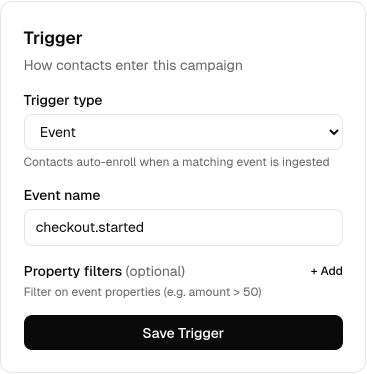
Event triggers depend on ingestion
Event triggers only fire for events you actually send to EngageApp. Make sure you're ingesting the relevant behavioral events through the API or an integration before relying on one — see the events guide for how to send them.
Next steps
- Return to the campaigns overview.
- Learn to send behavioral events.
- Build audiences with segments.
- Wire triggers into a flow in the flow builder.
Related
Campaigns overview
A campaign is a visual, multi-step flow that enrolls contacts and sends them messages across channels.
Events
Send behavioral events about your contacts to trigger campaigns, gate waits, and power segments.
Segments
Group contacts by attribute and behavior rules to target campaigns and manual enrollments.
Flow builder
The drag-and-drop canvas where you assemble a campaign from trigger, send, delay, condition, and wait-until steps.