3CX phone system integration
Turn calls into automation signals — trigger a follow-up when a call is missed, and show agents who is calling.
Connect your 3CX phone system and calls become ordinary events in EngageApp. That means everything you can already do with an event works on a call: start a campaign, branch on it, wait for one, or reference its details in a message.
What it unlocks
- Missed call follow-up — text the caller back automatically so the lead isn't lost.
- Post-call surveys — ask for feedback after a call ends.
- Escalation — do something different when someone calls repeatedly without ever being answered.
- Screen pop — the agent sees the caller's name and lifecycle stage before picking up.
- Quieter marketing — build a segment of people who called support recently, and exclude them from the next blast.
Connect your PBX
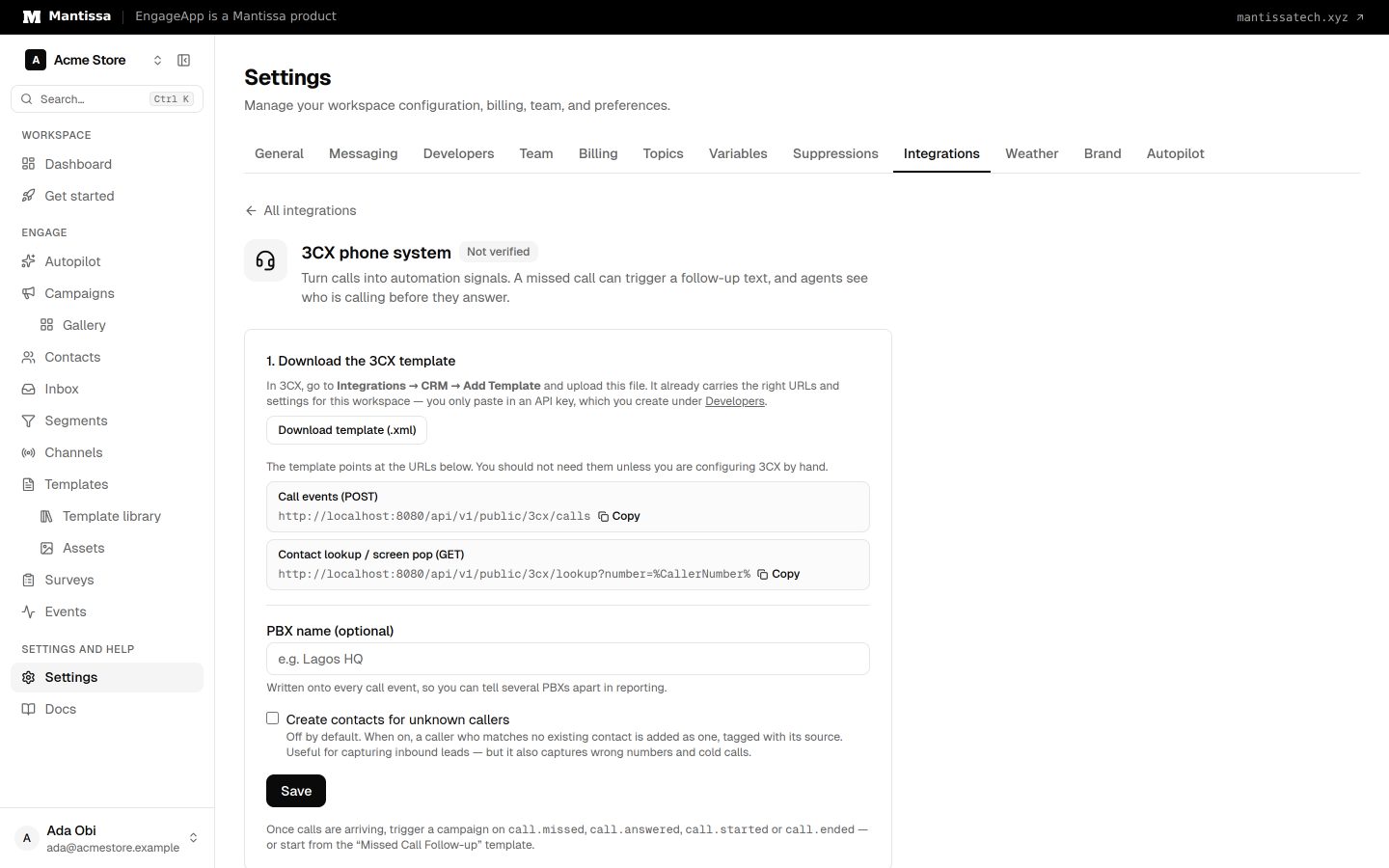
3CX can't simply be pointed at a URL — it expects a CRM template, one file describing the whole integration. EngageApp generates that file for you, already carrying your workspace's settings.
- Create an API key under Settings → Developers. That key is how your PBX authenticates — there is no separate password for this integration.
- Open Settings → Integrations and choose 3CX phone system. Then choose Download template (.xml).
- In your 3CX admin console, go to Integrations → CRM, choose Add Template, and upload the file.
- Select EngageApp in the CRM dropdown and paste your API key into the Workspace API key field. The other fields are already filled in.
- Press TEST with a phone number you know belongs to a contact, then Save.
- Back in EngageApp, choose Save on the 3CX page. Optionally name the PBX, so you can tell several apart in reporting.
Nothing else needs opening up: 3CX pushes to EngageApp, so your PBX doesn't have to be reachable from the internet.
Use the generated file rather than adapting one of 3CX's built-in templates. Two of their defaults break this integration silently. They trim a caller's number to its last 7 digits, which can't identify anybody — and 3CX ignores custom request headers, so the API key has to travel as Basic credentials instead. Neither failure announces itself: calls keep returning success and simply never reach a contact.
The API key is deliberately not baked into the download, so the file isn't a live credential sitting in your downloads folder.
TEST only checks the screen pop. It never sends a call event, so make one real call afterwards and confirm it lands on the Events page.
The events you get
| Event | When |
|---|---|
call.started | The phone starts ringing. |
call.answered | Someone picks up. |
call.ended | The call finishes. |
call.missed | Nobody answered. |
Each carries details you can branch on or drop into a message: direction, from, to, duration_seconds, ring_seconds, agent_name, queue, disposition and more. In a message body they read as {{ event.agent_name }}, exactly like any other event property.
How a call finds the right contact
A call carries a phone number and nothing else — no email, no customer ID. EngageApp matches that number against your contacts, normalizing both sides first, so 08012345678 on the PBX finds a contact saved as +234 801 234 5678. Which country a local-format number belongs to comes from your workspace's phone region under Settings → Messaging.
If the number matches nobody, the event is still recorded — it just isn't attached to anyone, so it won't trigger campaigns. Switch on Create contacts for unknown callers on the 3CX page to capture those instead. It's off by default because it also captures wrong numbers and cold calls; contacts it creates are tagged with their source so you can find them later.
When two contacts share a line — an office switchboard, a household — the oldest one wins.
Build the follow-up
Start from the Missed Call Follow-up template in the campaign gallery, or build it yourself: trigger on call.missed, add a short delay, then a wait step for call.answered with a 30-minute timeout. If the call gets returned in that window the contact leaves quietly; if not, they get a text. That way someone your team already called back doesn't get an apology message.
Repeated deliveries
A PBX retries when it doesn't get a clean response, so EngageApp ignores an event it has already seen. A re-delivered missed call won't enrol the same contact twice — but the separate ringing, answered and ended events of one call are all kept.
Next steps
- Trigger a campaign on a call event with campaign triggers.
- See how call events sit alongside your other events.
- Segment on call history from the contact timeline.
Related
Events
Send behavioral events about your contacts to trigger campaigns, gate waits, and power segments.
Triggers & enrollment
A trigger decides how contacts get enrolled into a campaign — manually, by event, on a schedule, or when they join or leave a segment.
Contacts
How EngageApp models your end-users as contacts, the fields they carry, and the ways to add them.