Events
Send behavioral events about your contacts to trigger campaigns, gate waits, and power segments.
An event is a behavioral signal you send about one of your contacts — a purchase, a page view, a feature used. Events are how EngageApp knows what your users are doing.
What an event contains
Each event has:
event_name— what happened (e.g.purchase).properties— an object of extra detail about the event (e.g. amount, product ID).occurred_at— when it happened.external_id— ties the event to a contact.
How an event finds its contact
EngageApp resolves each event to a contact using the first identifier it can match, in this order:
external_id— your own ID for the contact. Creates the contact if it doesn't exist yet.contact_id— EngageApp's own ID.email— matched case-insensitively.phone— matched in any format.08012345678,+234 801 234 5678and0801-234-5678all find the same contact, because numbers are normalized before matching using your workspace's phone number region (Settings → Messaging).
Email and phone look up an existing contact; unlike external_id, they never create one. An event whose identifier matches nothing is still stored — it just isn't attached to anyone, so it won't trigger campaigns. That's what makes phone matching useful for inbound signals like phone calls, where a number is all you have.
When several contacts share an identifier — an office line, a shared mailbox — the oldest contact wins.
Sending events
Ingest events one of two ways:
- Public API — call
POST /api/v1/public/eventsto batch events from your backend. - Integrations — connected tools such as Shopify, WooCommerce, and 3CX send events for you.
What events power
- Event-triggered campaigns — start a flow the moment an event arrives. See Triggers.
wait_untilsteps — hold a contact in a flow until they perform (or fail to perform) a given event.- Segment rules — build audiences from event history. See Segments.
Reviewing events
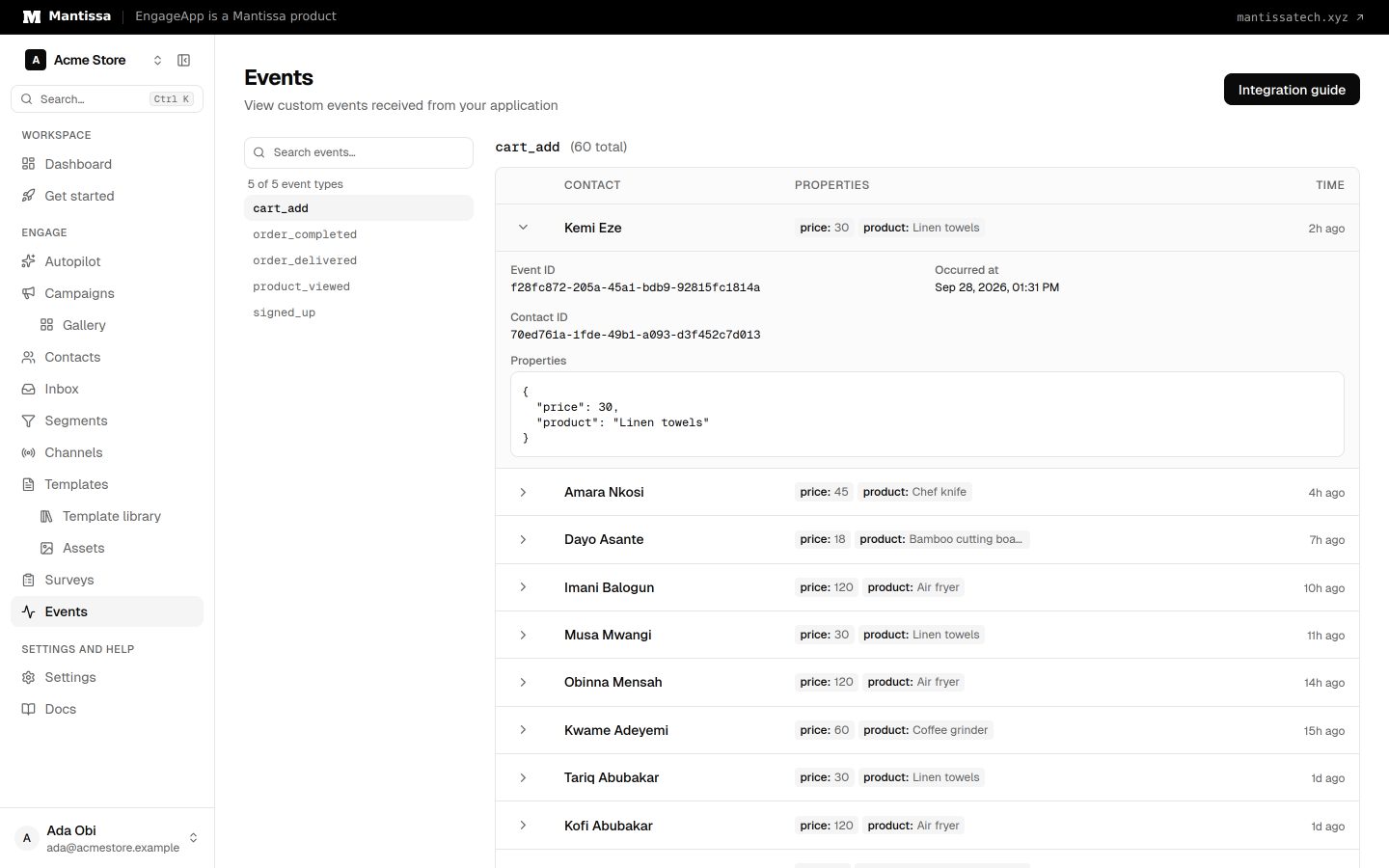
Open the Events page to review recent events as they arrive. This is the fastest way to confirm your integration is sending the data you expect before you build automation on top of it.
Next steps
- See how events attach to people in Contacts.
- Fire a campaign on an event with Triggers.
- Build behavioral audiences with Segments.
- Get call events without writing any code by connecting 3CX.
- Integrate ingestion via the public API reference.
Related
Contacts
How EngageApp models your end-users as contacts, the fields they carry, and the ways to add them.
Triggers & enrollment
A trigger decides how contacts get enrolled into a campaign — manually, by event, on a schedule, or when they join or leave a segment.
Segments
Group contacts by attribute and behavior rules to target campaigns and manual enrollments.
Public API reference
The public HTTP API for server-side and SDK integrations — authentication headers and endpoints.
3CX phone system integration
Turn calls into automation signals — trigger a follow-up when a call is missed, and show agents who is calling.