Getting started
Learn how EngageApp works — contacts, channels, templates, and campaigns — and how to authenticate with API keys.
EngageApp is a multi-channel engagement platform. You create channels, author templates, and run campaigns that deliver templated messages to your end-users (your contacts) across email, SMS, WhatsApp, push, a custom HTTP endpoint, and full-screen in-app takeovers.
Core concepts
- Contact — one of your end-users, identified by your own
external_id(plus optional email, phone, and custom attributes). - Channel — a configured delivery method (e.g. an SMTP email channel, an FCM push channel, or an In-App Takeover channel).
- Template — the message content for a channel, with
{{ variable }}placeholders resolved per contact. - Campaign — a visual flow that enrolls contacts and sends messages through channels on a schedule or trigger.
Authentication & API keys
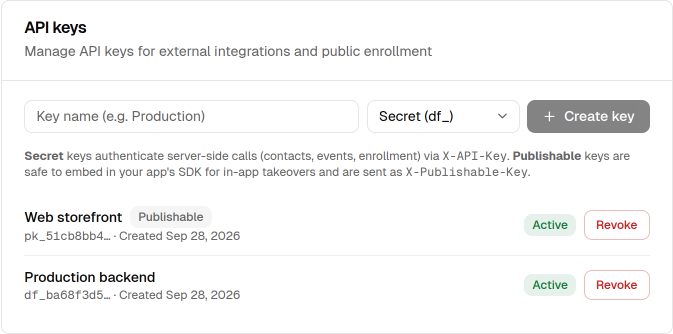
EngageApp uses two kinds of API keys, created under Settings → Developers:
- Secret keys (
df_…) authenticate your server-side calls (import contacts, ingest events, enroll contacts). Send them as theX-API-Keyheader. Never expose a secret key in client code. - Publishable keys (
pk_…) are safe to embed in your app and are used by the client SDKs for in-app takeovers. Send them as theX-Publishable-Keyheader.
The full plaintext key is shown only once, when you create it — copy it then.
Next steps
- Send your first event → first email with curl or Postman (about ten minutes).
- Explore the channels you can send through.
- Set up the In-App Takeover channel and integrate the SDK into your app.
- Review the public API reference for server-side integration.
Related
Send your first campaign
A ten-minute walkthrough that takes you from an empty workspace to a live campaign delivering messages to your contacts.
First event → first email
A ten-minute curl/Postman path from an ingested event to the first email — the same purchase_completed payload as the homepage, on the public events API.
Key concepts
A glossary of the core objects in EngageApp — contacts, channels, templates, campaigns, segments, events, and more.
Campaigns overview
A campaign is a visual, multi-step flow that enrolls contacts and sends them messages across channels.
Channels overview
The delivery channels EngageApp supports — email, SMS, WhatsApp, push, custom API, and full-screen in-app takeovers.