Flow builder
The drag-and-drop canvas where you assemble a campaign from trigger, send, delay, condition, and wait-until steps.
The flow builder is a drag-and-drop canvas where you assemble a campaign visually. Every flow starts from a single trigger (entry) node and branches out from there through the steps you add.
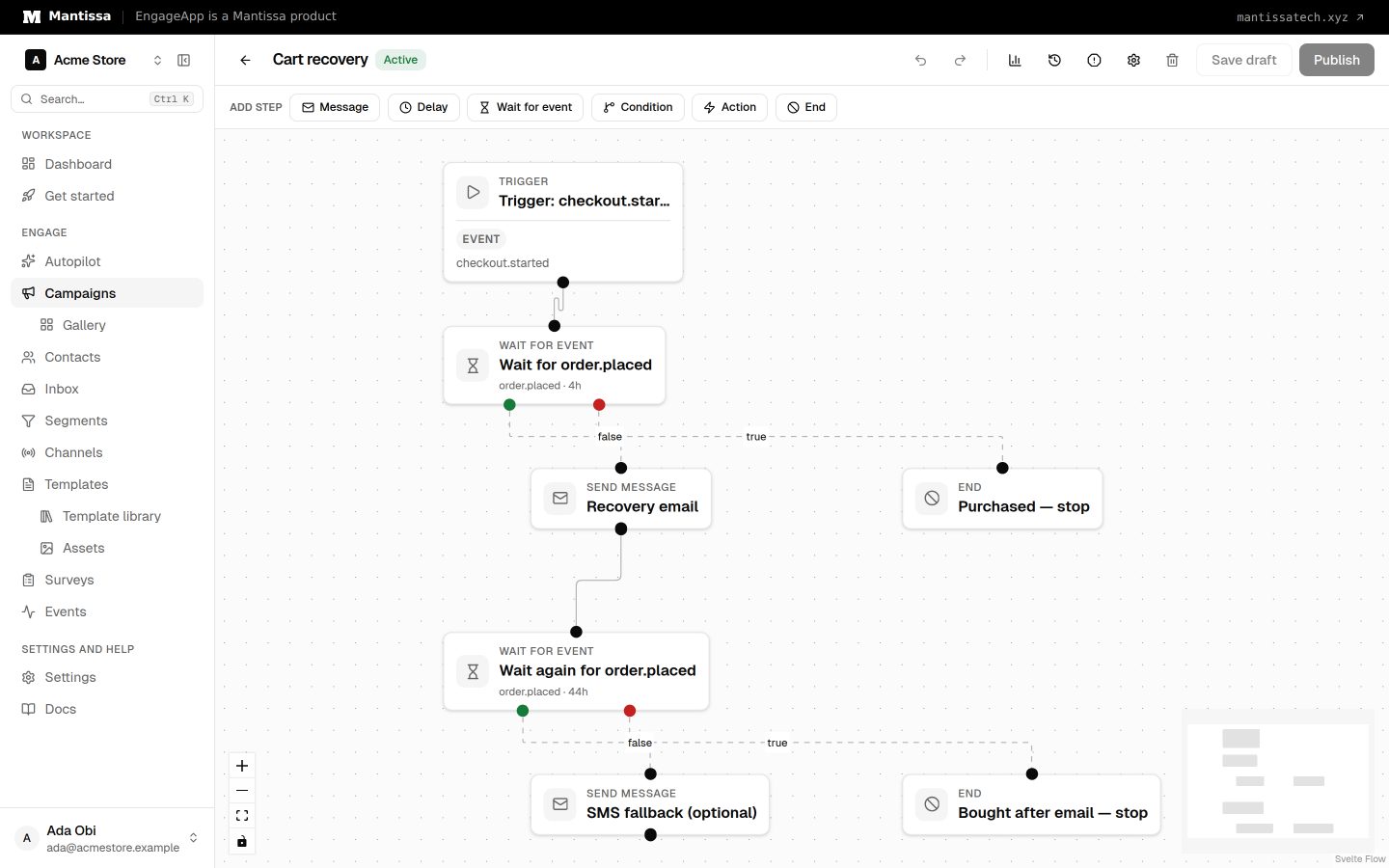
The trigger node
The trigger node shows the campaign's current entry condition on the canvas — the trigger type and what it's set to, such as the event name, the segment, or the weather condition and area. Click it to change the trigger without leaving the builder: the panel offers the same choices as triggers & enrollment, and saving writes to the campaign rather than the flow. A trigger that can't enrol anyone yet — an event trigger with no event, say — is marked Needs setup on the node.
Step types
Send message
The send_message step sends through a chosen channel and template. It also supports A/B variants so you can test different messages.
Delay
The delay step waits a fixed duration before moving on — useful for spacing out messages.
Condition
The condition step branches on a rule. The contact continues down the true edge if the rule matches, or the false edge if it doesn't. Rules match on contact fields, past events, or the weather, and use the same builder as segments — an event rule can be narrowed by occurrence count, time window, and event property filters (only count a purchase whose amount is over 100, say).
Wait until
The wait_until step (Wait for event in the builder) pauses the enrollment until the contact performs a named event. When the event occurs, the contact advances via the true edge; if an optional timeout elapses first, they take the false edge. A zero or absent timeout waits indefinitely. Cart recovery uses this as checkout.started → wait for order.placed (timeout 1–4 hours): buyers take true and skip the reminder; a timeout takes false and sends. Add property filters to wait for a specific occurrence rather than any one — an order.placed whose total is at least 50, for instance. Filters are combined with AND, and an event that doesn't match them leaves the contact waiting. Both the property and the value boxes suggest what your own events actually carry — the property names seen on that event, and the values seen at that property, most common first — so you don't have to remember how a field is spelled or cased.
To wait for a survey answer, pick the survey under Survey response. The step then waits for survey.completed from that survey only. See Surveys in campaigns.
Action
The action step does something other than messaging when a contact reaches it:
- Tag contact and update field — write back to the contact's own record, so later steps and segments can branch on it.
- Webhook — call a URL of yours.
- Add row to Google Sheet — append the contact as a row in one of your spreadsheets. See the Google Sheets integration.
- Write to Twenty CRM and Write to Chatwoot — send the contact to Twenty or Chatwoot.
Noop
The noop (no-operation) step, shown as End in the builder, does nothing on its own — use it to tidy up branching, such as rejoining two paths into one.
Edges
Steps are joined by edges, which are typed default, true, or false. Branching steps like condition and wait until use the true and false edges; straight-through steps use default.
Building a flow
To assemble a campaign: add steps to the canvas, connect them with edges to define the order and branches, then click each step to configure its settings — the channel and template for a send, the duration for a delay, the rule for a condition, and so on.
A new step from the Add step palette is wired to whichever step you have selected, as long as that step still has a free way out — select a condition and the next two steps you add fill its true and false branches. With nothing selected, the new step attaches to the last unconnected step instead.
Changing a step's type
Picked the wrong type? Select the step and change Step type in the panel — no need to delete it and redraw everything around it. The step keeps its name, its position and the connections that still apply: the step feeding it is untouched, a single outgoing edge moves onto the true branch when the step becomes a condition or wait-until, and a branch step becoming a straight-through one keeps its true path. Settings that don't exist on the new type are cleared, and anything you'd lose (a template, a duration, a second branch) is listed for confirmation first. The change is undoable with ⌘Z. The trigger is the exception — a campaign has one fixed entry point, configured on the trigger node itself.
Next steps
- Return to the campaigns overview.
- Set the entry point with triggers & enrollment.
- Test messages with A/B testing.
- Author the content your steps send in templates.
Related
Campaigns overview
A campaign is a visual, multi-step flow that enrolls contacts and sends them messages across channels.
Triggers & enrollment
A trigger decides how contacts get enrolled into a campaign — manually, by event, on a schedule, or when they join or leave a segment.
A/B testing
Add weighted message variants to a send step to test different templates and compare their performance in analytics.
Templates
Author reusable message content for each channel, with per-contact merge fields resolved at send time.
Google Sheets integration
Append a row to one of your spreadsheets from a campaign — contact details plus any custom columns you define.