Push channel
Send mobile push notifications through Firebase Cloud Messaging to a contact's registered devices.
The Push channel sends mobile push notifications via Firebase Cloud Messaging (FCM v1). It targets the devices a contact has registered with your app.
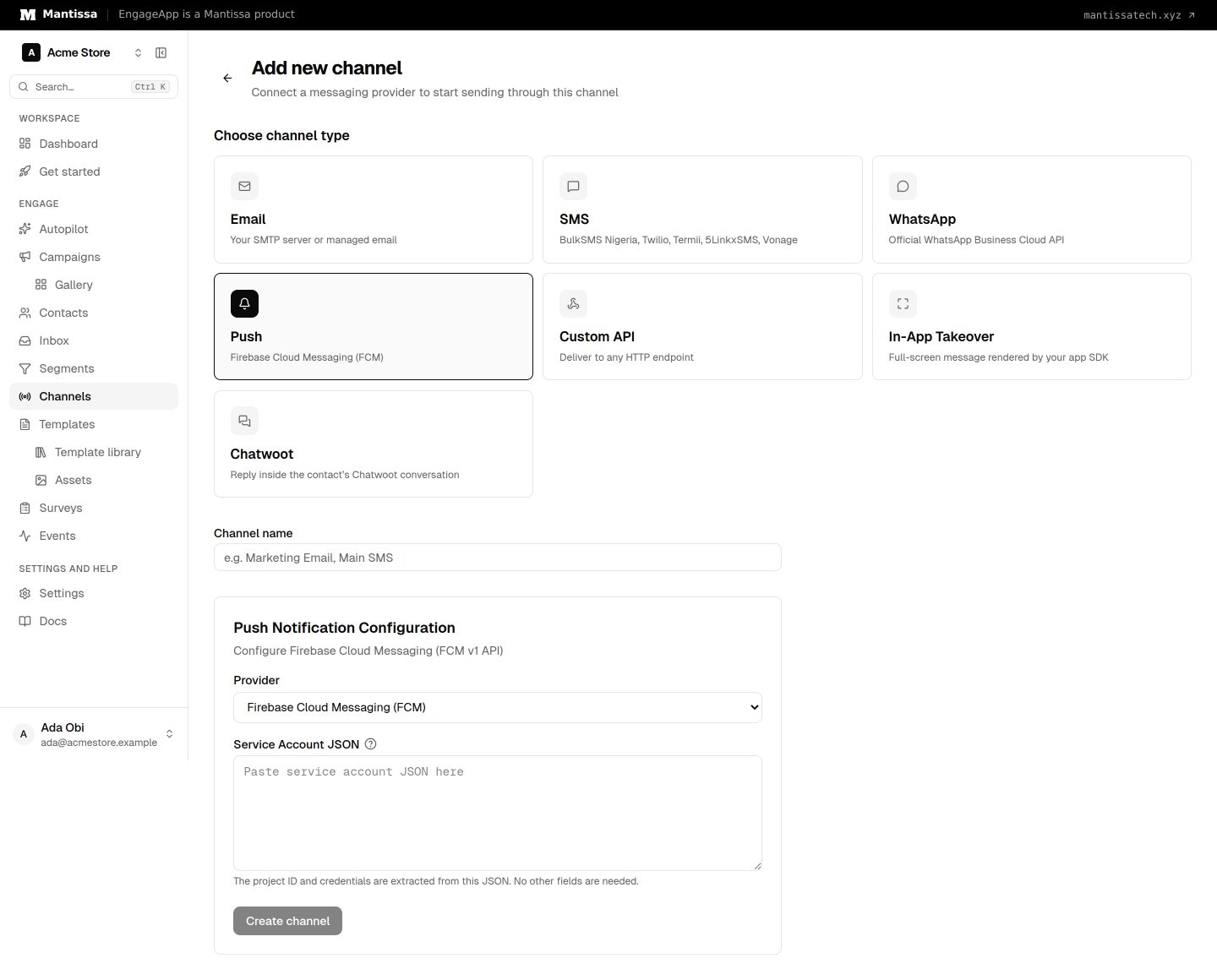
Create the channel
- Go to Channels → Add channel → Push.
- Paste your Firebase Service Account JSON (Firebase Console → Project Settings → Service accounts → Generate new private key). It is encrypted at rest.
- Save the channel so campaigns can reference it.
How targeting works
Push delivers to a contact's registered devices. A contact with no registered device can't receive a push, so make sure your app registers device tokens with EngageApp.
Author your content
Compose notifications with push templates — a title, body, and a deep-link click action that routes users into your app. Personalize with variables that resolve per contact at send time.
Deep links
To resolve a click action into an in-app destination, set your app's App URI scheme under Settings → Developers → Push deep links. The scheme lets a tapped notification open the right screen.
Credit cost
Push costs 1 credit per send.
Next steps
Related
Channels overview
The delivery channels EngageApp supports — email, SMS, WhatsApp, push, custom API, and full-screen in-app takeovers.
Push templates
Define the title, body, click action, and custom data for push notifications.
Contacts
How EngageApp models your end-users as contacts, the fields they carry, and the ways to add them.